Find quick answers about FireDoor Suite fire door inspection software — who it is for, how it works on site, what happens after the trial,
and how your data is handled.
No FAQs match that search. Try a different keyword or switch topic.
Trial & onboarding
Who is FireDoor Suite for?
Teams who carry out fire door inspections, upgrades, and remedials at scale: contractors, manufacturers, FM providers, and consultants. Want the full overview? See the product tour →
Built for real delivery: inspections, remedials, quotes, RAMS, invoices, scheduling, and portal access are all joined up.
Works across portfolios: organise clients, properties and doors so evidence and follow‑ups don’t get lost between spreadsheets.
Do we have to change everything on day one?
No. Most teams start small and layer FireDoor Suite into their existing workflow.
Start with one building: run a single real building or project in FireDoor alongside your current tools.
Keep templates in the background: keep using your existing reports and quotes as a safety net while you test the new workflow.
Scale up gradually: move more jobs into FireDoor as the team gets comfortable.
Is the trial the full product?
Yes. Your trial uses the full FireDoor Suite, not a cut‑down demo.
Full access: invite colleagues, add real buildings and doors, and use all main modules.
No card upfront: generate up to 5 PDF outputs (quotes, inspection reports, invoices, RAMs) without adding billing details.
Same workspace: keep using the same data if you decide to continue after the trial.
How should we run our trial?
Use the trial to run one complete workflow on a real building.
Pick one building: add 10–20 real doors you plan to inspect anyway.
Run the full loop: capture an inspection, turn fails into quotes and RAMs, and schedule remedials.
Compare outputs: generate PDFs and compare them with your current templates and process.
What happens after the trial?
Your workspace and data stay in place after the trial.
Continue seamlessly: add billing details and keep working from the same inspections, quotes, and remedials.
Invite more users: bring in colleagues as you move more work into FireDoor Suite.
Or stop: export key records first if it’s not the right fit. Need plan detail? See Pricing →
Can we invite a pilot team during the trial?
Yes. Invite colleagues into the same workspace and assign roles (Owner/Manager/Inspector) so you can test the real workflow together.
Role‑based access: give inspectors what they need on site, while owners/managers handle approvals, billing, and reporting.
Test the end‑to‑end flow: run a real building from inspection → follow‑ups → documents → portal updates.
Branding & workspace
Can we use our own colours and branding?
Yes. Each tenant workspace can use its own colours, logo, and naming, and that branding flows through into the client portal and documents.
Per‑client workspaces: set colours and logo during setup and adjust them later from workspace settings without development work.
Branded portals and PDFs: clients see their branding in the portal and in reports, quotes, RAMs, and invoices generated from FireDoor Suite.
Yes. Workspace branding carries through into client‑facing outputs like reports, quotes, RAMs, and invoices, so what clients see stays consistent end‑to‑end.
Consistent client experience: the portal and PDF outputs match your workspace’s logo/colours.
No rework: branding updates apply going forward without changing how inspectors work on site.
Is there a global workspace search?
Yes. Use the global search to quickly find inspections, doors, clients, quotes, invoices, RAMS, remedials, users, portal users, and pre‑bookings.
Fast retrieval: jump straight to the record you need without remembering which module it lives in.
Find by what you know: search by names, references, or keywords across multiple record types.
Plans & billing
Can we switch between Usage and Seat plans?
Yes. You can change between Usage and Seat pricing as your workload shifts.
Start where it fits: pick Usage for occasional work or Seat for teams in the app most weeks.
Switch later: talk to us about changing plan if your pattern of work changes.
Keep everything: plan changes don’t affect your existing buildings, doors, or documents.
Can we change seat counts later?
Yes. You can add or remove seats from within your workspace, and billing will adjust automatically.
Scale with your team: add seats when you hire or bring subcontractors in, then reduce when workload drops.
Owner controlled: manage seats from within the workspace billing area.
How are payments processed?
Payments are handled via Stripe using the built‑in billing module. You can download invoices from the client portal.
Secure billing: Stripe handles subscription payments and receipts.
Client payments: online invoice payments can be taken through the client portal when enabled.
How does workspace billing work?
Owners manage subscription billing inside the app. You can choose Usage or Seat pricing, update plan settings as your workload changes, and keep billing tied to the same workspace data.
One workspace, one subscription: your billing stays connected to the same inspections, documents, and portal access.
Change as you grow: switch plan type and settings as your delivery model changes.
Can we set up payouts for online invoice payments?
Yes. Connect Stripe for your workspace so clients can pay invoices online via the portal and payouts can be tracked in your workspace settings and analytics.
Stripe Connect: complete the onboarding so payouts can be sent to your bank.
Track outcomes: see paid/outstanding status and payout totals in the app.
Inspections & door register
Can we use it on site?
Yes. The app is designed for tablets and laptops, with offline‑friendly flows so inspectors can keep working with patchy connectivity. Want to see the full journey? Explore the workflows tour →
Designed for the visit: structured checklists, photos, notes, and clear pass/fail outcomes per door.
Minimise retyping: findings feed straight into remedials, quotes, documents, and portal updates.
Does it work offline?
Yes. Inspectors can save offline drafts on site and sync when they’re back online. If an offline sync ever fails, workspace owners get a notification so it can be resolved quickly.
Offline drafts: keep working during patchy signal, then sync when you’re connected again.
Visibility for managers: sync issues surface as notifications so they can be handled quickly.
How do you manage fire door inspections across multiple sites?
FireDoor Suite is built for portfolios, not single buildings, so you can keep inspections organised across many sites.
Structure by client and property: set up multiple clients, then add their estates, blocks, and buildings so doors and remedials stay tied to the right site.
Filters for regions and schemes: filter inspections, fails, and remedials by client, site, or project so you can see what needs attention across your portfolio.
Workflow from visit to sign‑off: move from on‑site checks through quotes, remedials, installs, and billing in one workflow. Want to see it visually? Explore the inspections workflow →
What does an inspection capture?
Inspections are structured around the real hierarchy: property → floor → door → findings.
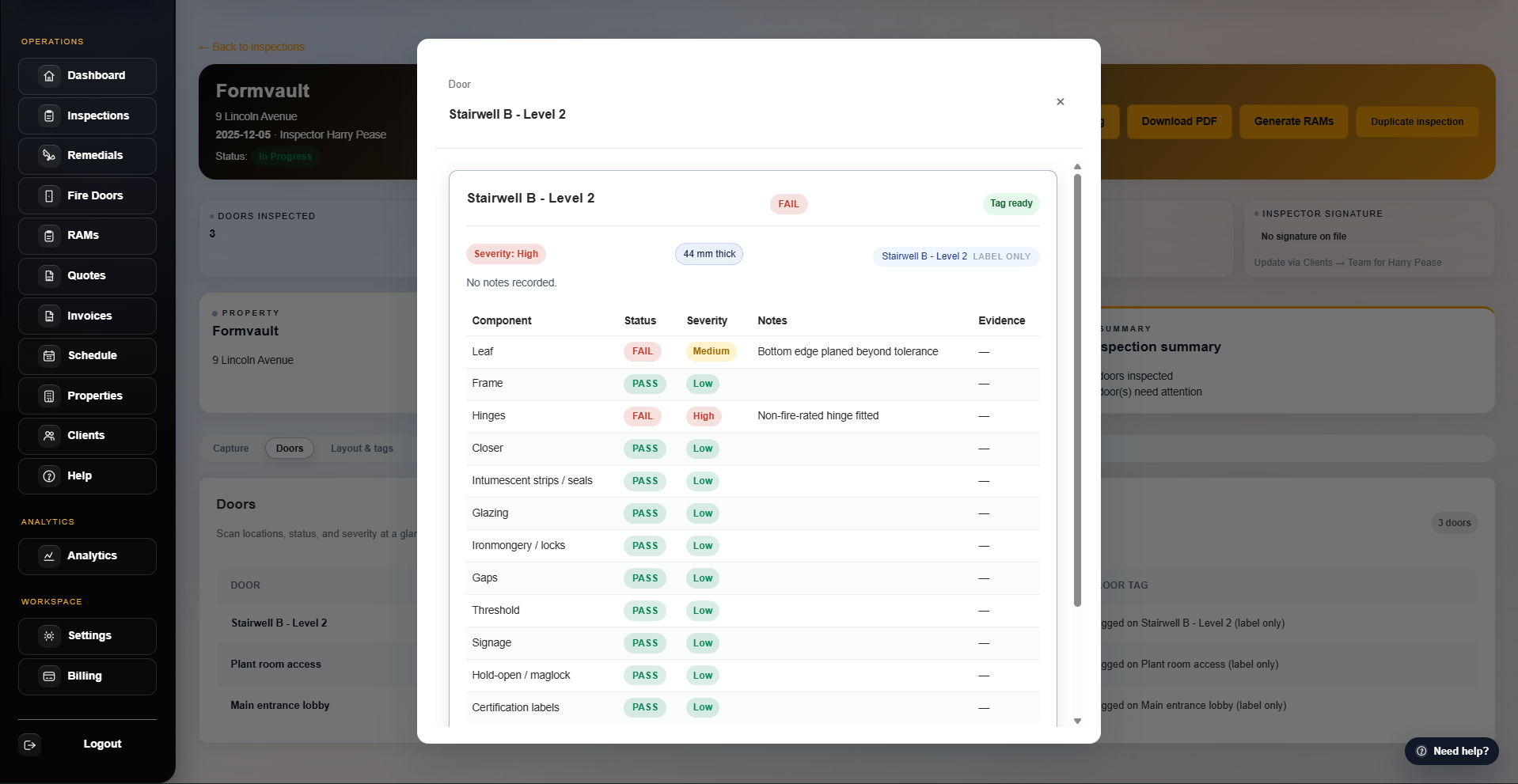
Door/component checks: record pass/fail, severity, notes and photos.
On-site friendly: keep working with offline drafts and sync when you’re back online.
Joined-up flow: failed findings can feed quotes, remedials and PDFs without retyping.
How do floorplans and door pins work?
Upload floorplans to an inspection and pin doors to locations so teams can find the right door fast and keep evidence tied to the right place.
Visual navigation: tap a pin to jump into the right door record while on site.
Clear context: keep floors/areas and door locations consistent across inspections and follow‑ups.
Can we export inspection reports and history?
Yes. You can generate inspection PDF reports and export inspection history data for reporting and handover.
PDF reports: produce client‑ready inspection outputs without manual formatting.
History & handover: export inspection data when sharing internally or moving between systems.
QR/NFC tags & scan logs
How do QR/NFC tags and scan logs work?
Scan a QR/NFC tag to jump straight into the right door record, and keep scan activity logged for traceability. You can also organise tags by floorplan and bulk print label PDFs when rolling out new sites. See tags & audit logging →
End‑to‑end traceability: scans are logged so you can see access and activity over time.
Rollout-friendly: organise by building/floorplan and print labels in bulk for install teams.
Can non‑staff scan a tag?
Yes. You can share controlled access for non‑staff where needed (for example a client on site), without giving full app access.
Limited exposure: show only what’s needed for that door, not the whole workspace.
Optional protection: add PIN gating for public access where required.
Can we roll out tags across a whole site quickly?
Yes. Teams typically roll out tags in bulk per building/floor and print label PDFs in batches, then use scan logs to confirm adoption and trace activity.
Batch workflows: roll out tags by site/floor and keep deployment organised.
Proof of rollout: scan logs help confirm that tags are live and being used.
Can we control access to tag scans?
Yes. Tag links are token-verified, you can PIN‑protect public door views for non‑staff, and scans are logged for traceability.
Token verification: tag URLs are verified before door details are shown.
Audit logging: keep a record of scanning activity for compliance and follow‑ups.
Can we bulk print door labels?
Yes. Generate label sheets as PDFs for bulk printing when you’re rolling out QR/NFC tags across a building or portfolio.
Bulk PDF labels: generate print-ready sheets for installers and on-site teams.
Consistent identifiers: keep door IDs aligned between tags, inspections, and portal records.
Quotes & documents
Can we generate quotes from inspections?
Yes. Failed findings can be turned into quotes with consistent pricing and exported as PDFs for sending to clients. See the builder & quote flow →
Turn fails into scope: build quotes directly from failed findings so nothing is missed.
Client‑ready output: generate a PDF and keep the quote linked to the same doors and evidence.
Do you have a fire door builder?
Yes. Owners can build FD30/FD60 specs with presets (glazing, hardware, install vs supply) and generate a client-ready PDF quote.
Preset driven: keep common configurations consistent across the team.
Faster quoting: generate client PDFs without rekeying specs each time.
Can we manage pricing line items in bulk?
Yes. Manage remedial line items and pricing presets in Settings, and use CSV import/export to update large price lists quickly.
CSV workflows: export a snapshot, update in a spreadsheet, then import changes back in.
FireDoor Suite supports professional PDFs across the workflow: inspection reports, quotes, RAMS, and invoices — all tied back to the same underlying inspection and project data.
One source of truth: documents stay linked to the same building/door records and history.
Ready to share: publish documents to clients via the portal when appropriate.
Do you support RAMS approval?
Yes. Create RAMS inside FireDoor Suite and use manager approval before generating the final PDF for clients and site teams.
Approval gated: require manager sign‑off before the final PDF can be issued.
Client delivery: share approved RAMS PDFs alongside other project documents.
How do signatures work on reports and PDFs?
FireDoor Suite supports signature capture for team users, and inspection PDFs can show signatures alongside the inspection record.
Who can sign: any team member can have a signature on file; inspection PDFs can include an inspector signature and a manager signature when those users are assigned.
Where signatures are stored: signatures are saved as a signature image on the user profile in your workspace (so the same signature can be reused on future reports).
How they appear on PDFs: the PDF shows a signature panel with the signer role (Inspector/Manager), name, and signature image (or “Signature not on file”).
Tied to the audit trail: signatures are pulled from the assigned users on the inspection record, so the signed PDF remains linked to the same inspection/door evidence and history.
Do invoices support deposits and reminders?
Yes. Create full/deposit/balance invoices, set defaults like VAT and payment terms, and send invoice reminders when chasing outstanding payments.
Flexible billing: handle deposits and balances without creating separate spreadsheets.
Reduce chasing: send reminders and track paid vs outstanding status.
Remedials & follow-ups
Does it handle remedials and installs?
Yes. You can move from inspections to remedial tasks and installs, track status, and communicate progress with clients via the portal. For a deeper look, see the remedials workflow →
Task tracking: assign, prioritise, and move remedials through statuses as work is completed.
Door context: remedials stay tied to the exact door and inspection evidence that created them.
Can FireDoor Suite remind us about follow‑ups?
Yes. Reminders and in‑app notifications help reduce chasing for upcoming visits, overdue actions, and client follow‑ups so nothing slips between spreadsheets and email threads. See reminders & notifications →
Upcoming & overdue: keep follow‑ups visible so nothing falls through the cracks.
In‑app notifications: owners/managers get a feed of key events without relying on email chains.
Can we capture before & after evidence?
Yes. Remedial tasks support before/after photo evidence so sign‑off stays tied to the right door and the right work.
Before/after photos: attach evidence directly to the remedial task.
Clear sign‑off: keep proof of work connected to the door record for audits.
How do client-reported issues become remedial tasks?
Clients can report issues from the portal against specific doors. Your team can triage them in the remedials area and convert them into tracked tasks.
Door‑level reporting: issues come in against the exact door, not a vague email description.
Triage to action: convert issues into assigned tasks with status tracking and evidence.
Scheduling
How does scheduling prevent clashes and overload?
The scheduling tools help you move work with conflict handling and understand availability/load so you can balance crews across sites. See scheduling intelligence →
Conflict awareness: reschedule jobs with checks that prevent double‑booking.
Load visibility: see availability and workload so you can balance teams across sites.
Can we see team availability at a glance?
Yes. You can view availability/load and make scheduling decisions with context, rather than guessing from scattered calendars.
Availability view: compare inspectors and crews across a date range.
Better dispatching: spot overload early and reassign before it becomes a missed visit.
What happens if a job has to move?
You can reschedule with conflict awareness so downstream work stays coordinated and crews don’t get double‑booked.
Move with confidence: handle clashes when shifting work around late changes.
Keep context: reschedules stay linked to the same client, property, and job record.
Can we capture pre‑bookings before they become inspections?
Yes. Log pre‑bookings (including inspection windows, contacts, and notes) and convert them into scheduled inspections when confirmed.
Capture early details: store windows, contacts, and notes so nothing is lost at handover.
Convert to inspections: turn a pre‑booking into a scheduled job when dates are confirmed.
Do you support day/week/month calendar views?
Yes. The schedule supports day/week/month views and keeps availability and conflicts visible when you’re moving work around.
Multiple views: plan tactically day‑to‑day or zoom out for weekly/monthly allocation.
Optional feed: a schedule feed endpoint is available for integrations where needed.
Client portal access
Can clients see their own information?
Yes. The client portal gives your customers secure access to reports, quotes, invoices, and RAMs you publish for them.
Secure access: portal users only see information for the clients and properties they’re invited to.
Everything in one place: keep documents, updates, and payment links out of email threads.
Can clients have their own branded portal?
Yes. Each tenant can set colours and branding that carry through into the client portal so it feels like an extension of your client’s organisation.
Workspace branding: choose colours, logo, and naming for each tenant so the portal, emails, and documents match their brand.
Per‑client experience: give different clients their own branded access while you still manage everything from one FireDoor Suite workspace.
Yes. Clients can pay invoices via Stripe from the portal, and your workspace can track paid vs outstanding invoices and follow-ups.
Portal “Pay now”: clients pay online without calling the office for bank details.
Status tracking: keep paid/outstanding/overdue visible for the team.
Can clients accept quotes in the portal?
Yes. Clients can review quotes and accept them in the portal, and your workspace is notified so you can move straight into scheduling and delivery.
Clear acceptance: reduce back-and-forth by capturing a single “accepted” status.
Faster delivery: acceptance notifications help teams move straight into scheduling and fulfilment.
Can we invite multiple portal users per client?
Yes. Invite multiple client portal users per client and control what they receive (for example invoices and inspection updates).
Invite the right people: add finance, FM, site staff, or compliance contacts as needed.
Notification controls: choose who receives invoice emails and inspection updates.
Is there a portal search?
Yes. Portal users can search across their invoices, quotes, inspections, reports and properties to find the right record quickly.
Less portal friction: search by keyword to jump to the right job or document.
Find records fast: avoid “can you resend that PDF” requests when clients can find it themselves.
Compliance outputs
What compliance outputs can clients get from the portal?
Clients can access compliance‑focused exports (CSV/PDF) and report issues through the portal so reporting and follow‑ups stay in one place. See portal compliance outputs →
Compliance exports: share structured CSVs and client‑friendly PDFs without manual formatting.
Joined-up follow‑ups: keep export data tied to the same door records and remedial actions.
Can clients report issues through the portal?
Yes. Clients can flag issues and keep communication tied to the right building/door context so nothing is lost in email threads.
Door-level reporting: issues are raised against specific doors for clarity.
Actionable for your team: triage issues and convert them into tracked remedial tasks.
Are exports suitable for compliance reporting?
Yes. The portal exports are designed to support compliance workflows, including sharing structured CSVs and client‑friendly PDFs.
Structured + shareable: CSV for analysis, PDF for client sign‑off and filing.
Portfolio-ready: export and share at the client/property level, not one-off doors.
Can clients filter and search compliance data?
Yes. The compliance views support filtering/search so clients can find the right building/door quickly before exporting.
Find what matters: filter and search before exporting to reduce noise.
Better questions: clients can self-serve and only escalate the gaps they can’t resolve.
Analytics & exports
What does analytics cover?
Analytics joins up the whole workflow so owners and managers can see outcomes and workload across inspections, remedials, quotes, invoices, scheduling, RAMS and portal activity. See Analytics & workspace →
Operations visibility: understand what’s happening across inspections, remedials, quotes, invoices, scheduling, and portal usage.
Filterable insights: drill down by time range and (where relevant) client/property to answer questions quickly.
Is there an activity or audit trail?
Yes. Analytics includes recent activity and audit views so you can review what changed, when it happened, and who did it.
Who/what/when: review events across key modules to support compliance and accountability.
Audit filtering: search and filter the audit feed to find the exact change you’re investigating.
Can we export analytics?
Yes. Download CSV exports for reporting and sharing internally.
Reporting packs: export CSVs for internal reporting, clients, or auditors.
Range based: export against a selected time range so numbers stay consistent.
Support
How do we get support?
Support is built into the app: create a ticket, send messages, and track replies in one place (with everything tied to your workspace).
In-app tickets: keep questions and answers tied to your workspace rather than scattered emails.
Conversation history: track replies and progress on each ticket in one thread.
Can we attach files to support tickets?
Yes. Attach screenshots or documents to a ticket so support can resolve issues faster.
Screenshots welcome: attach images or PDFs so support can see exactly what you’re seeing.
Faster diagnosis: reduce back‑and‑forth by sending relevant context up front.
Do you have in‑app notifications?
Yes. FireDoor Suite includes an in‑app notifications feed for key events (like follow‑ups, quotes/invoices activity, support replies, and offline sync problems) so owners and managers don’t miss critical updates.
Central feed: see important events in one place instead of relying on email chains.
Actionable signals: stay on top of follow‑ups, support replies, payments, and sync issues.
Security & data control
Who can see our data?
Access is controlled at workspace and user level.
Workspace isolation: each customer gets a separate workspace (tenant) so data isn’t mixed between organisations.
Invited users only: only people you invite can access your inspections, quotes, remedials, and invoices.
Role‑based access: different roles can be given different permissions where needed.
Where is our data hosted?
FireDoor Suite is designed for UK and EU teams.
Regional hosting: data is hosted in UK/EU regions to support typical residency expectations.
Built for compliance: the platform is designed around UK fire door and building safety workflows.
Can we export our data?
You can export key records as PDFs and CSVs from within the app. If you ever need help with exports, our support team can assist.
Export as you go: generate PDFs (reports/quotes/RAMS/invoices) and download CSVs for reporting.
Migration support: if you ever need structured exports, we can help plan what you need and how to extract it.
Can we get more detail for our IT or compliance team?
Yes. We can provide extra detail for technical or compliance reviews.
Security overview: high‑level information on hosting, access controls, and backups.
Data handling: how inspections, documents, and exports are stored and accessed.
Tailored responses: share your questions and we’ll respond with focused answers rather than generic marketing copy.
Hosting & backups
FireDoor Suite is hosted in UK/EU regions with regular backups and a focus on fire‑door compliance workflows.
UK/EU hosted: designed for UK/EU teams and typical residency expectations.
Regular backups: backups are part of the standard platform operations.
Access & permissions
Each customer has an isolated workspace with invited users and role‑based access to inspections, quotes, remedials, and documents.
Tenant isolation: workspaces are separated so your data isn’t mixed with other organisations.
Role based access: invite only the people you need and assign permissions by role.
Exports & leaving
You can export key records as PDFs and CSVs at any time, and we can support structured exports if you ever need to move data elsewhere.
Always exportable: keep copies of key documents and datasets without waiting on support.
Help when needed: we can assist with structured exports for migrations or audits.